
Xiaomi File Manager
Screenshots
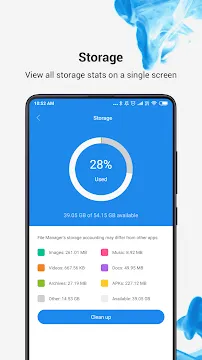
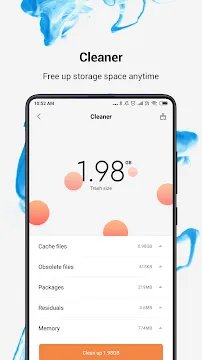
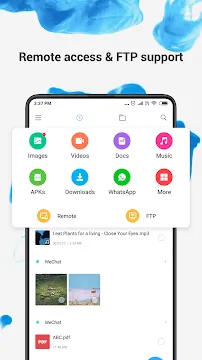
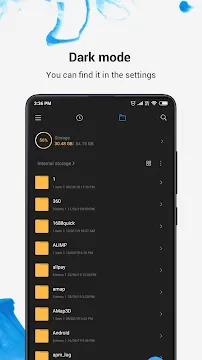
Xiaomi File Manager is a highly efficient tool designed to help users organize their local data with precision. It offers a clean interface that simplifies the way you interact with your storage. Instead of navigating complex folders, you can see your files categorized by type. This application handles everything from documents and images to compressed archives and system files. It focuses on speed and reliability, ensuring that you can find what you need in seconds. Many users appreciate its ability to manage large amounts of data without slowing down the device. By prioritizing a user-friendly layout, the software makes file handling accessible to everyone.
Understanding the Xiaomi File Manager Interface
The primary strength of the Xiaomi File Manager lies in its intuitive visual organization. When you open the app, it presents a dashboard with clear icons for different file formats. You can quickly see how much space your photos, videos, and music consume. This high-level view helps you identify which categories are taking up the most room. Transitioning between the category view and the traditional folder view is seamless.
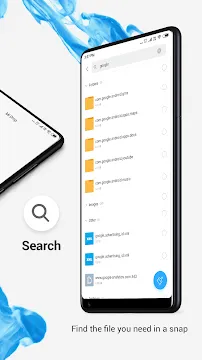
Furthermore, the search functionality is incredibly responsive. You can type a partial name, and the app scans your entire storage instantly. It also supports recent file tracking, which displays the items you have worked on lately. This feature saves time for people who frequently download documents or capture screenshots. The overall design minimizes clicks, making it one of the most streamlined management tools available.
How to Optimize Storage with Xiaomi File Manager
Managing storage becomes a simple task when you use the built-in optimization tools. The Xiaomi File Manager includes a dedicated “Cleaner” feature that identifies unnecessary data. It looks for temporary cache files, obsolete installation packages, and empty folders. By removing these items, you can reclaim significant amounts of storage space. This process is safe and does not delete your personal photos or important documents.
Additionally, the app helps you find large files that you might have forgotten. It lists them by size, allowing you to decide which ones to keep or delete. You can also identify duplicate images that are cluttering your gallery. This proactive approach to data management ensures your device remains fast and responsive. Regularly using these optimization features prevents your storage from reaching its limit.
Key Features for Professional File Handling
The software includes advanced features that cater to both casual users and professionals. It goes beyond simple moving and copying to offer deep system integration. Here are some of the most helpful features you will find:
- FTP Support: Connect your phone to a computer wirelessly to transfer files over a local network.
- File Compression: Compress files into ZIP or RAR formats to save space or share multiple items easily.
- Built-in Viewer: Open documents, images, and videos directly within the app without needing extra software.
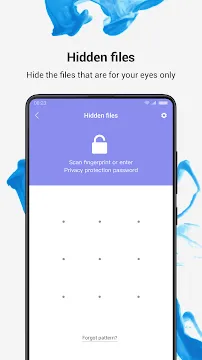
- Private Folder: Protect sensitive files with a password or fingerprint lock for extra security.
- Batch Rename: Change the names of multiple files at once to keep your library organized.
- Cloud Integration: Connect to popular cloud storage services to manage all your data from one screen.
Managing Your Media Library Effectively
The Xiaomi File Manager excels at handling media files like high-resolution photos and 4K videos. It generates thumbnails for all images, allowing you to browse your gallery without opening every file. You can easily sort your media by date, size, or name to find specific memories. The app also allows you to move files to an SD card with a single tap. This is particularly useful for users who store their entire music or movie collection on external storage.
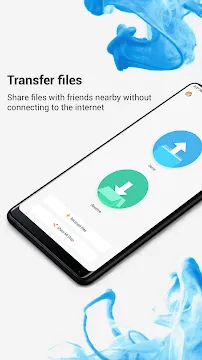
Moreover, the software simplifies the process of sharing media. You can select multiple files and send them through messaging apps or email directly from the manager. It even includes a “Mi Drop” or “ShareMe” integration for fast wireless transfers between devices. This level of connectivity makes it easy to collaborate with others or back up your data to a laptop.
Enhancing Security and Privacy for Your Data
Security is a top priority for any modern file management tool. This application provides a secure environment for your most important data. You can move documents to a “Hidden Folder” which keeps them away from the main library. This folder requires a separate authentication method, such as a PIN or pattern. By doing this, you ensure that even if someone else uses your phone, they cannot access your private information.
The app also handles system permissions carefully. It only asks for access to the storage it needs to function. You can also see which apps have recently modified your files. This transparency helps you spot suspicious activity or apps that are consuming too much data. Managing your privacy settings within the app is straightforward and gives you total control over your digital footprint.
Advanced Shortcuts and Customization Options
Customizing your experience is easy with the various settings provided. You can change the view from a grid to a list depending on your preference. You can also pin your most frequently used folders to the top of the list for quick access. This customization ensures that the tool fits your specific workflow perfectly.
The app also supports dark mode, which reduces eye strain during night use. You can toggle the visibility of hidden system files if you need to perform advanced troubleshooting. These options show that the developers thought about both the beginner and the power user. The flexibility of the software ensures it remains a top choice for a wide variety of users.
Conclusion
Xiaomi File Manager is a comprehensive solution for anyone looking to master their mobile storage. It combines a clean design with powerful tools like FTP support and file compression. The built-in cleaner ensures your device stays free of clutter, while the private folder protects your sensitive data. With its fast search and easy categorization, finding files is no longer a chore. Whether you are moving media to an SD card or renaming a batch of documents, the app performs the task with ease. It provides a stable and secure way to keep your digital life organized and accessible at all times.







